01 · Companion
System health you can read at a glance.
Byte reacts to typing, clicks, charging, network activity, heat, memory pressure, low battery and more—while still behaving like a character, not a gauge.
A desktop companion that understands your PC.
Byte turns system health into a small, expressive character on your desktop—so you can tell when your PC is calm, busy, stressed, or actually needs attention without living inside a hardware dashboard.
Companion, Quick Panel, and full app—three levels of detail instead of one giant monitoring screen.
Three layers, one tiny companion
Byte stays quiet until you need more detail. Most of the time, the character and its environment are enough. One click opens the explanation. The full app is there for the deeper stuff.
Byte reacts to typing, clicks, charging, network activity, heat, memory pressure, low battery and more—while still behaving like a character, not a gauge.
Get the current status, primary issue, resource overview, companion controls and safe Windows actions without opening a large application.
Review activity, inspect current app resource usage, change the companion, tune notifications and accessibility, or revisit privacy and startup settings.
Pick your desktop roommate
They share the same system intelligence, but not the same personality on screen. Every character has its own authored poses, reactions, rare idles and palettes.

The original compact robot. Calm, expressive, and built for tiny desktop spaces.
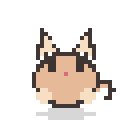
A round cat-like companion with big paws, bouncy reactions, and Bongo-Cat energy.

A soft blob companion with simple expressions and playful squash-and-stretch motion.

A lively bird companion with pecking typing reactions and energetic movement.
What Byte actually does
The point is not to add another technical dashboard to your desktop. Byte filters local system signals into something understandable, then stays out of the way.
Byte watches CPU, memory, storage, network, battery and best-effort temperature locally, then turns them into plain-language states: Calm, Busy, Stressed, or Needs attention.
The Quick Panel explains the most important issue, shows a compact resource overview, and offers safe shortcuts like Task Manager or Windows storage settings.
Open the full app for Overview, Activity history, point-in-time app diagnostics, customization, notification controls, accessibility options, and settings.
Choose Byte, Mochi, Pip or Kiwi, then place them in Meadow, Cozy Desk, Bedroom, Space, Aquarium or Rooftop. Add palettes, cosmetics, decorations and a personality.
Byte can hide for fullscreen games, movies and presentations, pause heavier work during lock and sleep states, and restore itself when your desktop returns.
There is no account or cloud analytics. Byte does not collect typed text, key identity, browser history, clipboard content or mouse-coordinate history.
Local means local
System monitoring and interaction reactions stay on your machine. Global input is anonymous activity only: Byte does not store which keys you pressed, what you typed, your clipboard, window titles, browsing history or cursor coordinates.
Your first five minutes
Byte is designed so you should not need a manual, but here is the complete start-to-finish path.
Download the Windows installer below and run it. It installs for your current Windows user, so administrator elevation is not normally required.
Byte explains what it can read locally, lets you enable or disable system monitoring, and keeps Smart Notifications off unless you explicitly opt in.
Pick Byte, Mochi, Pip or Kiwi, select a habitat and decide whether you want the full Habitat, Perch, Mini, Edge or Tray-only display mode.
Use Move Byte from the Quick Panel or tray menu, drag the companion once, and Byte remembers a safe monitor-relative position for that mode.
The Quick Panel shows the current state, key resources and the most important issue. Open the full app only when you want history, app diagnostics or settings.
Open Customize to change palettes, habitats, cosmetics, decorations, personality, size and interaction level. Changes save locally and apply immediately.
Display modes
The full little world around your companion.
A smaller companion that sits against the Windows work area.
Character-only mode for the smallest footprint.
Keeps Byte snapped to the side of your screen.
Hide the companion while Byte keeps monitoring locally.
Smart Notifications
Byte uses sustained timing, recovery rules and per-category cooldowns instead of firing notifications for every temporary spike. You choose which categories are allowed, and you can use Quiet mode or snooze them.
Byte 0.1.0
The installer is the recommended option. The portable ZIP contains a standalone Byte.exe if you prefer not to install the app.
A few useful answers
No. System telemetry, customization and activity history stay local. Byte does not use cloud analytics or require an account.
Yes. Byte can automatically suppress the companion during fullscreen and presentation states, then restore it afterward. You can also use Tray mode whenever you want it completely out of the way.
No. Byte intentionally avoids generic process killing, RAM trimming and “optimizer” behavior. It explains issues and can open a small allowlist of safe Windows destinations such as Task Manager.
Byte does not silently poll, download or install updates. You choose Stable or Beta in Settings and use Check for updates when you want to open the corresponding official GitHub release page.
Ready?